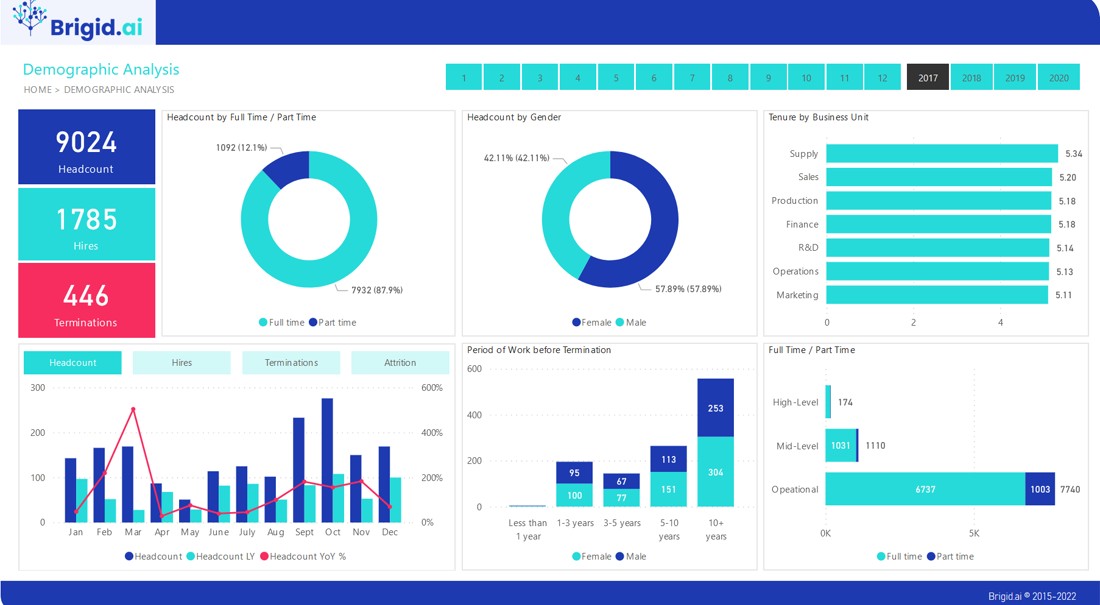
This intensive five-day training program is strategically designed to equip HR professionals, analysts, and business leaders with the essential skills to transition from reactive HR reporting to proactive, data-driven Human Resource Analytics. Participants will gain mastery over the core concepts of workforce metrics, understand how to align HR data with organizational strategy, and, most importantly, learn to build powerful, interactive dashboards and reports using Microsoft Power BI. The course focuses on practical application, enabling attendees to clean, model, analyze, and visualize complex HR data to generate actionable business insights that enhance talent decisions and organizational performance.
The curriculum provides a brief overview of key topics, beginning with establishing a solid Foundation in HR Analytics and setting up the Power BI Desktop environment. A significant portion of the course is dedicated to hands-on learning in Data Transformation using Power Query and writing sophisticated DAX Measures specific to HR calculations like turnover and cost metrics. We then deep-dive into creating analytical dashboards for core HR functions, including Recruitment, Compensation, and L&D, covering advanced visualization and report storytelling techniques. The final Module addresses the crucial aspects of Report Sharing, Governance, and the future of Predictive HR Analytics.
Who should attend the training
- HR Managers and Directors
- HR Business Partners
- HR Analysts and Specialists
- Workforce Planners
- Compensation and Benefits Professionals
- Learning and Development Managers
Objectives of the training
- Differentiate between simple HR metrics and strategic HR analytics, aligning data insights with business goals
- Master the Power BI environment, including data connection, transformation, and visualization setup
- Develop complex DAX formulas to calculate advanced HR metrics like regrettable turnover, time-to-hire, and training ROI
- Design and implement interactive, professional-grade HR dashboards for Executive and Managerial audiences
- Conduct root cause analysis on critical HR issues (e.g., high turnover, recruitment bottlenecks) using data modeling
- Present data-driven narratives and recommendations that lead to measurable improvements in talent management and organizational effectiveness
Personal benefits
- Become a strategic, data-literate partner within your organization by translating HR data into business value
- Gain a highly sought-after technical skill in Power BI, enhancing career progression opportunities
- Increase personal efficiency by automating manual HR reporting processes through Power Query and scheduled refreshes
- Develop the ability to independently create robust, decision-support dashboards for various HR functions
- Elevate the quality and credibility of your recommendations using compelling data visualizations and analytics
Organizational benefits
- Improve decision-making quality in talent acquisition, retention, and workforce planning
- Accurately measure the ROI and effectiveness of key HR programs like training and wellness initiatives
- Reduce critical risk by identifying trends in regrettable turnover or pay equity gaps earlier
- Standardize HR reporting across the organization, ensuring data accuracy and consistency
- Foster a culture of evidence-based management by providing managers with real-time, actionable HR insights
Training methodology
- Hands-on, guided lab sessions where participants build dashboards from scratch
- Case studies focused on real-world HR data challenges (e.g., analyzing pay equity, modeling retention)
- Interactive lectures and group discussions on translating business problems into analytical models
- Step-by-step tutorials on Power Query ETL (Extract, Transform, Load) and DAX formula writing
- Critiques and peer review of dashboard designs for best practice adherence
- Q&A sessions with the trainer on specific organizational data hurdles
Course Duration: 5 days
Training fee: USD 1500
Trainer Experience
Our trainers are seasoned HR analytics practitioners and certified Power BI experts who have successfully implemented data strategies in large, global organizations. They bring a wealth of practical experience in connecting diverse HRIS data sources, developing complex DAX logic for strategic HR reporting, and designing user-friendly dashboards that drive executive action. Their expertise ensures a deep dive into both the technical aspects of Power BI and the strategic context of HR Analytics.
Quality Statement
We are dedicated to providing a high-caliber learning experience. Our curriculum is continually updated to incorporate the latest features of Power BI and current best practices in strategic workforce analytics. We utilize proprietary, cleaned datasets simulating real HR environments to ensure practical relevance. Our commitment is to deliver training that results in immediate and demonstrable improvements in the participants' ability to execute and communicate HR analytics.
Tailor-made courses
We understand that every organization has unique HR challenges and systems. We offer customization services to adapt this course content to your specific needs, including integration with your existing HRIS/ATS systems, focusing on your most critical metrics (e.g., diversity metrics, specific compliance needs), or providing deeper dives into particular DAX functions relevant to your payroll or compensation structure.
Module 1: Foundations of HR Metrics and Strategic Analytics
- Defining the difference: HR Metrics vs. HR Analytics and their strategic roles
- Identifying and linking HR data points to key business outcomes and organizational value
- Understanding common HR data pitfalls: integrity, availability, and privacy concerns
- The Human Capital Value Chain: how HR activities translate to tangible results
- Establishing a framework for prioritizing and measuring high-impact metrics
- Practical session: Participants will define the top five strategic HR questions their organization needs to answer and identify the necessary data points.
Module 2: Power BI Desktop: Setup, Data Connection, and Interface
- Overview of the Power BI ecosystem: Desktop, Service, and Mobile
- Connecting to various HR data sources: Excel, CSV, SharePoint lists, and basic databases
- Navigating the three views in Power BI Desktop: Report, Data, and Model
- Understanding data types, privacy levels, and initial data loading best practices
- Introduction to creating the first visuals: Bar charts, Cards, and Tables
- Practical session: Connecting Power BI to simulated HR data sources (e.g., HRIS dump, performance spreadsheet) and performing the initial data load and review.
Module 3: Data Transformation and Cleaning using Power Query Editor
- Introduction to Power Query (M language) and its role as the ETL tool
- Cleaning and shaping HR data: handling duplicates, missing values, and inconsistent formatting
- Merging and appending queries to integrate data from different HR systems (e.g., Recruitment + Employee Master)
- Creating derived columns (e.g., tenure bands, age groups) for easier analysis
- Pivoting and unpivoting data to achieve the optimal structure for data modeling
- Practical session: Using Power Query to cleanse and transform a messy, non-standard employee turnover dataset into a clean 'Fact' table ready for analytical modeling.
Module 4: Mastering DAX for HR Calculations and Business Logic
- Understanding the fundamentals of DAX (Data Analysis Expressions) and context (Row vs. Filter)
- Creating essential Measures for core HR metrics (e.g., Headcount, Attrition Rate, Average Salary)
- Utilizing CALCULATE and Time Intelligence functions for period-over-period comparisons (e.g., MTD, YTD turnover)
- Creating Calculated Columns vs. Measures: when and how to use each effectively
- Advanced DAX patterns: ranking, cumulative calculations, and dealing with inactive relationships
- Practical session: Writing multiple complex DAX measures, including 'Regrettable Turnover Rate' and 'Average Time-to-Fill by Department' with relevant filters.
Module 5: Designing Interactive Workforce and Engagement Dashboards
- Principles of effective dashboard design: layout, color theory, and visual hierarchy
- Analyzing Headcount and Demographics: visualizing diversity, age, and tenure distributions
- Calculating and visualizing various Turnover/Attrition metrics (voluntary, involuntary, regrettable)
- Implementing filtering, slicing, and drill-through actions for detailed investigation
- Utilizing bookmarks and tooltips to enhance interactivity and provide contextual information
- Practical session: Building a comprehensive Workforce and Retention dashboard, utilizing calculated measures and interactive slicers for departmental drill-down.
Module 6: Analytics for Recruitment, Talent Acquisition, and Efficiency
- Defining key recruitment metrics: Time-to-Fill, Time-to-Hire, Cost-per-Hire, and Quality of Hire
- Modeling the recruitment pipeline funnel: visualizing candidate progression and drop-off rates
- Analyzing sourcing channel effectiveness and calculating conversion rates by source
- Implementing a dashboard to track recruiter performance and workload distribution
- Using advanced filtering to identify bottlenecks in the talent acquisition process
- Practical session: Creating a detailed Recruitment Funnel dashboard to identify where candidates are stalling and calculating the efficiency of three different recruiting channels.
Module 7: Learning & Development (L&D) and Performance Analytics
- Measuring participation rates, completion status, and costs associated with training programs
- Modeling the relationship between training participation and key performance indicators (KPIs)
- Visualizing performance data: distribution curves, nine-box grids, and goal achievement rates
- Analyzing the impact of specific training programs on employee performance scores (simple ROI)
- Integrating performance data with compensation and tenure data for talent pool analysis
- Practical session: Building a dashboard that analyzes L&D spend per employee and correlates training hours with performance rating increases over a specified period.
Module 8: Compensation, Equity, and Total Rewards Analysis
- Calculating and visualizing compensation metrics: compa-ratio, salary ranges, and quartile analysis
- Conducting a Pay Equity/Pay Gap Analysis by gender, ethnicity, and other protected characteristics
- Modeling total rewards components: visualizing the value of benefits and non-monetary compensation
- Using reference lines and conditional formatting to highlight pay discrepancies against market benchmarks
- Techniques for presenting sensitive compensation data to leadership while maintaining privacy
- Practical session: Developing visuals and measures to calculate and display the adjusted and unadjusted pay gaps for a specific protected group across different job levels.
Module 9: Advanced Data Visualization and Storytelling in Power BI
- Selecting the right visualization for the HR metric (e.g., waterfall charts for budget, scatter plots for correlation)
- Customizing visuals and applying appropriate color palettes and branding themes
- Implementing best practices for conveying a clear, actionable data narrative (storytelling with data)
- Utilizing advanced visual types: custom visuals, decomposition trees, and KPIs
- Creating effective titles, annotations, and callouts to guide the audience's attention to key insights
- Practical session: Redesigning a basic HR report using advanced visualization techniques and adding narrative elements to communicate a clear, data-driven recommendation to leadership.
Module 10: Report Sharing, Governance, and Introduction to Predictive HR Analytics
- Publishing reports to the Power BI Service and setting up data refresh schedules
- Understanding security, access control, and Row-Level Security (RLS) for sensitive HR data
- Utilizing Apps and Gateways for streamlined report distribution and data connectivity
- Introduction to Predictive HR Analytics: concepts of employee flight risk modeling
- Reviewing basic forecasting visuals in Power BI for predicting future headcount or attrition
- Practical session: Implementing Row-Level Security (RLS) in a dashboard so that managers can only view data for their respective teams upon logging into the Power BI Service.
Requirements:
· Participants should be reasonably proficient in English.
· Applicants must live up to Armstrong Global Institute admission criteria.
Terms and Conditions
1. Discounts: Organizations sponsoring Four Participants will have the 5th attend Free
2. What is catered for by the Course Fees: Fees cater for all requirements for the training – Learning materials, Lunches, Teas, Snacks and Certification. All participants will additionally cater for their travel and accommodation expenses, visa application, insurance, and other personal expenses.
3. Certificate Awarded: Participants are awarded Certificates of Participation at the end of the training.
4. The program content shown here is for guidance purposes only. Our continuous course improvement process may lead to changes in topics and course structure.
5. Approval of Course: Our Programs are NITA Approved. Participating organizations can therefore claim reimbursement on fees paid in accordance with NITA Rules.
Booking for Training
Simply send an email to the Training Officer on training@armstrongglobalinstitute.com and we will send you a registration form. We advise you to book early to avoid missing a seat to this training.
Or call us on +254720272325 / +254725012095 / +254724452588
Payment Options
We provide 3 payment options, choose one for your convenience, and kindly make payments at least 5 days before the Training start date to reserve your seat:
1. Groups of 5 People and Above – Cheque Payments to: Armstrong Global Training & Development Center Limited should be paid in advance, 5 days to the training.
2. Invoice: We can send a bill directly to you or your company.
3. Deposit directly into Bank Account (Account details provided upon request)
Cancellation Policy
1. Payment for all courses includes a registration fee, which is non-refundable, and equals 15% of the total sum of the course fee.
2. Participants may cancel attendance 14 days or more prior to the training commencement date.
3. No refunds will be made 14 days or less before the training commencement date. However, participants who are unable to attend may opt to attend a similar training course at a later date or send a substitute participant provided the participation criteria have been met.
Tailor Made Courses
This training course can also be customized for your institution upon request for a minimum of 5 participants. You can have it conducted at our Training Centre or at a convenient location. For further inquiries, please contact us on Tel: +254720272325 / +254725012095 / +254724452588 or Email training@armstrongglobalinstitute.com
Accommodation and Airport Transfer
Accommodation and Airport Transfer is arranged upon request and at extra cost. For reservations contact the Training Officer on Email: training@armstrongglobalinstitute.com or on Tel: +254720272325 / +254725012095 / +254724452588